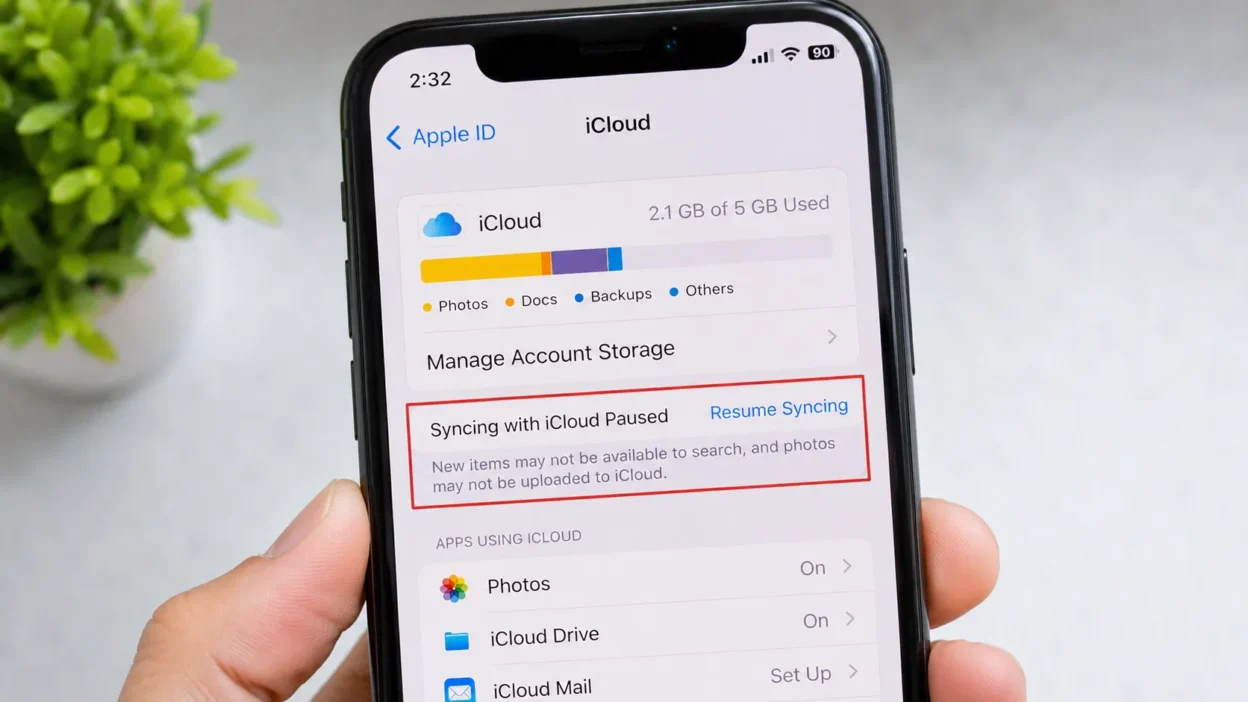
You open your iPhone settings one day. Everything looks normal. But then you notice a small message “Syncing with iCloud Paused.”
Instantly, your heart sinks. Is something wrong? Did you lose your photos? Is your backup broken?
Take a breath. You are not alone. Millions of iPhone users see this message every single day. And most of them have no idea what it means.
Quick Answer:
“Syncing with iCloud Paused” means your iPhone has temporarily stopped sending data to iCloud. It is NOT an error. It is a normal status message. Your data is safe. The sync will usually resume on its own.
🧠 What Does “Syncing with iCloud Paused” Actually Mean?
Let’s break it down simply.
When your iPhone works normally, it constantly sends your photos, contacts, notes, and files to Apple’s servers. This is called iCloud syncing. It keeps your data safe and updated across all your Apple devices.
But sometimes, your iPhone stops this process temporarily. When that happens, you see the message: “Syncing with iCloud Paused.”
Think of it this way. Imagine your iPhone is a delivery truck. iCloud is the warehouse. The truck delivers your data (packages) to the warehouse every day.
When syncing is paused? The truck has pulled over. It is waiting for better conditions a better road, more fuel, or a green light before it continues.
The good news? In most cases, the truck starts moving again on its own. You don’t need to do anything.
In short: Syncing with iCloud Paused = iCloud backup temporarily on hold = your data is safe.
📱 Where Does This Message Appear?
This message can show up in several places on your iPhone, iPad, or Mac. Here is where you will most likely see it:
- 📷 Photos App Go to Settings > [Your Name] > iCloud > Photos
- ☁️ iCloud Drive When your documents are not uploading
- 🔒 iCloud Backup Under Settings > [Your Name] > iCloud > iCloud Backup
- 🎵 Apple Music When your music library sync is on hold
- 📧 Mail, Contacts, Calendars When app data is delayed
- 🖥️ Mac System Settings If you use iCloud on a MacBook
This is not a social media term or texting slang. It is an official Apple system message. It only appears inside iOS, iPadOS, and macOS settings.
💬 7 Common Reasons Why iCloud Syncing Pauses
Here are the most common causes. Each one is explained with a simple real-life chat example.
Reason 1 Low Power Mode 🔋
When your battery is low, the iPhone turns on Low Power Mode. This automatically pauses iCloud sync to save battery.
A: My photos won’t upload to iCloud! B: Are you on Low Power Mode? That pauses iCloud automatically 🔋
Reason 2 No Wi-Fi Connection 📶
iCloud prefers Wi-Fi. If you’re on mobile data, it may pause syncing to save your data plan.
A: “Syncing with iCloud Paused” keeps showing up on my phone 😩 B: You’re probably on cellular data. Connect to Wi-Fi and it should fix itself 📶
Reason 3 iCloud Storage Is Full ☁️❌
Apple gives you 5GB of free iCloud storage. When it fills up, syncing stops completely.
A: My iCloud stopped syncing and I don’t know why B: Check your storage if it’s full, sync won’t work until you free up space or upgrade
Reason 4 Your Screen Is On 🔌😴
iCloud usually syncs in the background. It waits until your screen is off and your phone is charging.
A: Does iCloud only sync when I’m not using my phone? B: Pretty much! It waits until your screen locks and you’re plugged in 😴
Reason 5 Weak Internet Signal 📡
Even with Wi-Fi, a weak or unstable signal can pause iCloud sync.
A: My sync paused but I’m connected to Wi-Fi B: Might be a weak signal iCloud needs a stable connection to work 📡
Reason 6 Apple Server Issues 🍎⚠️
Sometimes the problem is on Apple’s side. Their servers can go down too.
A: Nothing is syncing today. Is iCloud down? B: Could be! Check Apple’s System Status page to see if there’s an outage 🍎
Reason 7 Pending iOS Update 🔄📲
If you’ve been ignoring software update reminders, it can sometimes pause background syncing.
A: iCloud paused right after I got an update notification B: Some updates delay syncing until your iOS is current just update and you should be fine 🔄
🕓 When to Relax vs. When to Take Action
Not every paused sync needs your attention. Here’s how to tell the difference.
✅ Don’t Worry It’s Totally Normal If:
- Your iPhone is in Low Power Mode it will resume when you charge it
- You are not on Wi-Fi it will sync once you connect
- Your screen is active iCloud waits until you’re idle
- It just happened once or briefly completely normal
- You just restarted your phone give it a few minutes to settle
❌ You Should Take Action If:
- The message has shown for multiple days without going away
- Your iCloud storage is full you’ll usually see a second warning too
- You haven’t had a successful backup in several weeks
- You changed your Apple ID and didn’t sign back in properly
- Your iOS version is very outdated
Quick Reference Table:
| Situation | What It Means | Do You Need to Act? |
| Low Power Mode is on | Saving battery | No resumes when charged |
| No Wi-Fi | Waiting for connection | Connect to Wi-Fi |
| iCloud storage full | No room to upload | Upgrade or free space |
| Apple servers down | Temporary outage | Wait and check Apple’s status page |
| Screen is active | Waiting for idle time | No syncs when screen locks |
| Outdated iOS | Compatibility issue | Update your iOS |
🔄 Similar iCloud Messages What Do They Mean?
Sometimes you’ll see other related messages. Here’s a quick guide:
| Message | What It Means | What to Do |
| “iCloud Backup Failed” | Last backup did not finish | Check storage and Wi-Fi, then try again |
| “Waiting for Wi-Fi” | Sync is queued and waiting | Connect to a Wi-Fi network |
| “iCloud Storage Full” | No space left in your free 5GB | Buy more storage or delete old files |
| “Sync Paused Low Power” | Low Power Mode is active | Charge your device |
| “iCloud is not available” | Account or server issue | Sign out and back into your Apple ID |
| “Uploading X items” | Sync is working right now ✅ | Nothing this is the good one! |
❓ FAQs About “Syncing with iCloud Paused”
Q: Is this message an error? A: No. It is a status notification, not an error. Your data is not lost or damaged.
Q: Will I lose my data while sync is paused? A: No. Everything already backed up stays safe. Only new changes won’t upload until sync resumes.
Q: How do I manually restart iCloud sync? A: Go to Settings > [Your Name] > iCloud. Toggle off the relevant app, then toggle it back on. Or simply connect to Wi-Fi and plug in your charger.
Q: Does Low Power Mode always pause iCloud? A: Yes. Apple does this on purpose to save your battery. Sync resumes automatically once you charge.
Q: How long does this pause usually last? A: Usually just a few minutes. If it lasts more than a day or two, check your storage, Wi-Fi connection, and iOS version.

Ernest Hemingway is a passionate writer and storyteller, dedicated to sharing meaningful messages that inspire, motivate, and connect people. Through his work on MsgVibes.com, he brings thoughtful insights and heartfelt words to readers around the world